torsdag 18. april 2013

Tutorial: Animating in Photoshop

Hello and welcome to a Panimated Tutorial!

I recently made a downloadable template on deviantArt , so I thought I'd make a tutorial, in case people need help finding their way through the scary jungle that is animating in photoshop.
I'm using Photoshop CS5 on a mac, but it should work more or less the same on any Photoshop and OS's.

So here we are, let's get started! (click on the images if they are too small to see)


First, when you open your template, you'll see something like this...


(I'm using the half-version (har har literally har har) so no one will steal my precious frames. But it works JUST the same, so never fear.)

So, first off, you'll need the animation-window in photoshop... This will show you the animation, as frames. To open it, click Window>Animation.


You should now get something like this:


(Notice the window at the bottom.. This is the timeline, and every box is a frame.)


If your window looks different, with a long weird green bar and whatnot (I don't know myself), like this:


 Just click the little timeline-button in the bottom right of the same window.


It should change to that frame-by-frame-timeline-window you want.
(If you don't get the weird green bar, you're fine, don't click the button, just move on)

If you click the little Play-button on the bottom left in the window, you can see the animation! yaaaaaaaaaaaaaaaaay.
However it might stop after every time you play it, which is annoying. But you can make it run forever, in an endless loop, if you use the dropdown-menu to the bottom left in the animation-window.
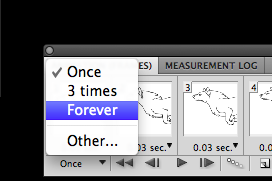


Choose FOREVEEEER
watch it run and rund and run. Click the stop-button whenever you feel like it.

Next, lets get colouring this mutt.

You CAN draw straight on the art with the layer on it, but that's really not recommended. Let's make a layer for the colour. And yes, you'll have to colour every frame seperately.


As you see, the layer called "frame 1" is the only layer visible on frame one in the timeline. If you select the different frames, you'll see what layers are visible. If you select the second frame in the timeline, the layer called "frame 2" should be visible. To make layers visible/invisible, click the little eye to the left of the layer.

HERE'S A BIG TIP FOR YOU WHO ARE AS LAZY AS ME: If you think 12 frames is a lot to colour, just cut out every second frame, and use half the frames. Select frame 2, 4, 6, 8, 10 and 12 on the timeline, and drag them to the little bin-symbol on the bottom of the animation-window.
(your wolf will be running a lot faster now, so you might want to slow down the framerate. I'll talk about how to do this a little later.)

Let's move on to colouring. As you see in the last window, I've made a layer under frame 1 and called it colour1. You can call it whatever you want, but it's nice to know which frame it belongs to (thereof the number 1). let's splash some colour on this picture...


plop. But wait, what is this?? When you try and play the animation now, the colour is visible on all the frames! WHAAT THE FLIP


Don't worry, that's easy to fix. You see, every time you make a new layer, that will become visible on ALL the frames! Don't ask me why, that's just the way it is. I suggest you select all the frames, make the layer with the colour on it invisible. THEN, select the frame you just coloured, and make the colour-layer visible again.
IT STILL APPEARS ON ALL THE FRAMES??
Well, that is probably because you are on the first frame. The first frame is like a master-frame, so if you change something on that, ALL the other frames will change too.
Ughhh, I know, it's stupid. So you'll have to be careful.
Just make frame 1 right, then select all the other frames and make the unwanted layers invisible. make the colour-layer invisible again. ok. Now it should work. If it doesn't, just play around until it's right. It'll make sense after a while.

NOW!

Keep making layers and adding colours...


I suggest you make a colour-layer for all the frames straight away (make sure the colour-layer is always under the line-art-layer, or else things will turn weird), then select frame one and make all the new colour-layers invisible. This way you can select the frames you want, when you want, and make the colour-layer that belongs to it visible as you go.

so the layers would be like this:

frame 3
colour 3
frame 2
colour2
frame 1
colour 1

and so on.

And the layers 'frame 1' and 'colour 1' will be visible on frame one in the timeline.
And the layers 'frame 2' and 'colour 2' will be visible on frame two in the timeline.

It kinda makes sense, right?


Now just keep going like this until you're done!


50 YEARS LATER
Make sure the layers that are supposed to be visible on this and that frame is visible when it's supposed to, and... that's it! You're pretty much done!
You can keep adding layers, maybe another colour-layer, or if you even want to add a scarf or hair, or legwarmers or shoes or horns or claws, you can do that as well! But your layers might become a mess, so I suggest you put things into folders. So everything on frame is in it's own folder, and everything that's in frame two is in another folder, etc.


........brilliant. Well you get the point.
Ok. Now, before we move on to saving this beauty...


Let's set the framerate. 

This animation fits well for 24 frames per second, so let's make every picture show for about 0.04 seconds.


Select all the frames (click first frame, hold shift, click the last frame) and click on one of the little numbers on the bottom of the frame (it already says 0.04 on this picture, but might not on yours).
Select "Other", and a box should pop up. Enter "0.04" and click ok. Now, if you play it, it should run at 24 fps! smooooth...

If you earlier did as I suggested, and deleted every second frame, you might want to decrease the framerate to 12 frames per second. If so, just enter "0.08" instead of "0.04".
You can also make it run at 12 fps if you simply want your wolf to run slower.


Here's what your wolf should look like if you kept all frames, and play it at 24 fps (0.04 sec per picture)


And here's what your wolf will look like if you kept all frames, but play it on 12 fps (0.08 sec per picture)
It's kinda nice, right? I think I prefer this one, to be honest. It's not as smooth, but it makes the movement a lot easier to look at.
And here's how it will look with half the frames cut, on 12 fps (0.08 sec per picture)


It's not as smooth, but it makes it twice as fast to animate!

OK! Last step! It's time to save this thing.

Go to File > Save for Web & Devices


And you'll get a big window popping up, looking something like this:


Before you click save, make sure the settings in the upper right corner looks more or less like this:


There are many ways to save the gif, but I use these settings. You can play around with the settings (it MUST be a gif though, or it won't be animated) and see how it affects the colours, appearance and filesize.

Click save, choose a location aaaaaand

YOU'RE DONE!


HURRAAAAAAAAAAAAAAAAY

Thank you for using this tutorial! If you have any questions, leave them in the comments below.
Please consider buying the template as well  as I'm in need of some pennies, and if you're new to animating in photoshop, it's a great way to get started! THANK YOU!

søndag 17. februar 2013

Epic Shopping with Sonja

HEY GUYS

I think from now on I'll just write in English, because, you people home in Norway, you know English pretty well, so I think you can handle it. Seriously, a lot of Norwegians know better English than many English-speaking people. Weird, ey.
ANYWAYS I know it's weird and you won't get the regular, full experience of my exceptional writing skills, but it's really too bad to write in a language that only about (does math for like 20 minutes (seriously)) 0.067% of the world is speaking. ...approximately.
I might revert back a bit here and there if I come up with a pun or something that only works in Norwegian. Like a bonus for knowing norwegian! go learn a new language, eh

So anyways, I'm in my yearly only-listens-to-epic-soundtracks-phase, which makes a lot of things very epic. Sometimes maybe a bit ridiculously epic. I sometimes go shopping, and when I go alone I'm usually wearing headphones, listening to delicious, delicious music. This is what I've been wanting to illustrate for this blog-entry! HOLD ON, BECAUSE YOU'RE GOING ON AN EPIC SHOPPING TRIP

(and probably very short one too, not more than.. a minute or so. yeh.)

Anyways, FIRST, it's important that you get the right music ready, so you get in the epic mood I experience while I go shopping. So take this soundtrack on youtube:

-AND SET IT TO ABOUT 1:10-

(that's where it gets intense-ish)


START THE MUSIC AND SCROLL!
(you should spend about 5-10 second on each picture or.. it'll be a bit short. uhm GO ON)

EPICALLY STANDING ON THE EPIC BUS STOP IN THE EPIC RAIN


EPICALLY GET ON THE EPIC DOUBLE-DECKER


EPICALLY PLOW THROUGH THE EPIC MASSES


EPICALLY TAKE THE EPIC ESCALATOR


EPICALLY LOOK AT EPIC CLOTHES

TRY ON (not so) EPIC CLOTHES EPICALLY


WALK EPICALLY THROUGH THE EPIC ISLES


STAND IN THE EPIC QUEUE EPICALLY FOR AN EPIC AMOUNT OF TIME


EAT AN EPIC SNACK

CARRY EPICALLY HEAVY BAGS TO THE EPIC BUS STOP


EPICALLY TAKE THE EPIC BUS HOME AGAIN


TAKE AN EPIC CUP OF TEA TO CELEBRATE YOUR EPIC SUCCESS

Congratulations, you just had an epic shopping trip. 
You can turn off the music now.

Because I can!

fredag 15. februar 2013

A Walrusy Valentine's day

HELLU FREDDEH

Today I'm writing in English because I'm uploading some stuffy things that a classmate and I made.
So AH, YES, it's been valentine's day! We don't really celebrate it in Norway, so I don't care much for it. Or maybe we do celebrate it, and I just ignore it because I think it's... overly cheesy. And superficial. Even now that I have a boyfriend. WOO PRINCIPLES

SO anyways, I know it was yesterday, but I'm a genius and forgot my USB-stick at uni so I couldn't do this blog yesterday. I thought I'd have to wait until monday to get it back (one of my classmates held onto it for me), but then I ran into a nice little co-inkydink. I was going out to give a classmate of mine her sketchbook back (which I stole unintentionally) I ran into two of my other classmates just outside my door, and one of them were the one who had my USB-stick. So yeah, that's the story of how I lost and found my stupid, cheap little (undeservingly important) USB-stick in just two short days.

SO WHAT WAS ON THIS STICK THAT WAS SO IMPORTANT YOU MAY ASK

well, you see, we were working in flash that day, and it was valentine's day, as I said. Rachel who sat beside me was, should I say, a little distracted from the assignment. She was drawing walruses (which was actually a part of her project - to begin with) . She made a Elton-John-like "Walrus of love" first, then a french one. I joined in and made a russian one, and soon all the computers in the classroom had walruses of different nationality as their desktop background.

Behold, the walruses!


The first one, the Frence Amorous Walrus - By Rachel


I joined in with a russian one..


North-Korean walrus by Rachel.. (I think she knows their alphabet, but not the language - I know neither, so don't ask me what those sign at the bottom mean)


Patriotic walrus from the humble New World, made by me..


A kawaii walrus from Japan by Rachel


A beautiful she-male walrus, fresh from Brazil - By me


This mexican badass was made by Rachel


And the easiest one, with maybe the hardest one to find a quote for, we had to have an English one - by me.


And a Jamaican Walrus, and my favourite pun... By Rachel.


Our classroom is now 90% more lovable and has lost 100% of its buckets.
I'm sorry there's no norwegian one, but I thought.. they would just look like regular walruses, haaaha-

So that was pretty much what I did for valentine's. I made burgers for dinner, which I ate while talking to Magnus on Skype and mostly telling him to GTFO.
And then I watched Pokemon 2000.


Because I can <3

C U L8R MY DEER BUKKITS


—Sonja


fredag 8. februar 2013

Eg lev eg lev eg lev


HEIA

eg har en blogg in the making, ska last den opp snart!
se på den her imens, du.
den stoppa
ALDRI

akkurat som meg

torsdag 13. desember 2012

Siste dag i London før jul

Skal snart hjem til jul, og prøver desperat å få lagt ut et siste innlegg. Desperat fordi internett-tilkoblinga mi er håpløs akkurat nå. Dette er tredje forsøk på å laste opp!

Så, jeg heiv nettopp to brød-innsmurte torskefiléter i ovnen, og skal prøve å skrive så mye som mulig før jeg sett meg ned med en episode QI og spiser fish & chips. Jeg tegna noen bilder i går, for å fortelle om et par ting fra mitt opphold i englandens land de siste tre månedene.


Kanskje litt sent, men her er et røfft kart over nabolaget. (røff- fra engelsk rough, enda et ord som later som det er norskt)
bildet forklarer vel seg selv. Greit nabolag! Nord og østover for meg finner du veldig fine, veldig engelske hus. Vestover, mot ASDA (supermarked), er det masse små dritthus, og edgware street, som basically er en eneste lang innvandrerbutikk.


Kart over universitetet, forhåpentligvis forklarer det seg selv..!


Dere har sikkert vært borti sånne garderobe-dusj-anlegg på offentlige bad eller på skole, og i de dusjene er det ganske vanlig at man ikke kan endre temperaturen på dusjvannet. RIGHT?
Jeg tenkte dusjen min var sånn i to måneder. Den var støkk på ok til kald temperatur kjempelenge, og jeg tenkte det var meninga. MEN en dag så kom det en inspektør, og jeg spurte om man skal kunne endre tempen, og JAAAda, det skulle man. Så for omtrent to uker siden kom det noen og fiksa den, sånn at jeg kunne ta en uanstendig varm dusj


Briter elsker å pakke ting inn i plast, også pakke dem enda en gang inn i plast. de elsker det. og store pakker finnes ikke, ikke sjokolade, ikke potetgull, ikke noe godteri finnes i store pakker. Jeg liker store pakker. en stor pakke med masse små pakker er IKKE noe jeg vil ha mer av.

Britiske folk er veldig høflige!


Vinduet mitt er ikke lyd-isolerende, og naboene liker å spille SHIT-musikk


Magnus var på besøk litt, vi så bl. a. på buckingham palace. 


OK nå skal jeg spise. NAMNAM, SNAKKES I NORGE!


mandag 3. desember 2012

Amerikanerne og den mystiske valutaen

HALÅ

Nå som ønskelista er publisert så er det jul for fullt. Derfor gikk jeg på julegaveshopping her om dagen! Det var lørdag formiddag, og jeg dro ned til Tottenham court road og gikk mot Oxford circus.


Kjølig dag, klar himmel, ikke noe å klage på unntatt at det var mye folk, men hva forventer du når du er i Londons mest populære handlegate på en lørdag? En må virkelig bruke mye hjernekraft når man navigerer seg mellom folkemassene som befinner seg i hver eneste butikk.
Uansett, etter en stund ble jeg ganske tørst...


Det kjentes ut som om innsiden av halsen min var dekket av dopapir. og ikke sånn mykt, godt dopapir, men sånn billig, grått, glava-aktig papir som man bare finner hjemme hos gjerrigknarker og på offentlige toalett. Så jeg bestemte meg for å svinge innom neste kiosk. 


Enda så tørst jeg var, så hadde butikken en liten suvenir-avdeling, hvor jeg ble litt distrahert.


Mens jeg stod der og vurderte julegave-potensialet til noen av suvenirene, hørte jeg plutselig en underlig lyd i min venstre ørekanal...


Det var den umiskjennelige lyden av amerikanere som har forvillet seg ut av sitt vanlige økosystem. I sin forvirring må de ha sett maten inne i denne lille butikken og trodd det var en Wal-mart, og søkt ly og trøst i den. De hadde samlet opp en mengde mat for å overleve, og forsøkte nå å kommunisere med en av de innfødte. 

Kommunikasjonen så ut til å gå smertefritt, helt til de skulle betale. 


Også lo de litt, sa at de ikke ante det, og sa at de følte seg dumme. Og så betalte de med kort.


Jeg tenkte faktisk ikke at det var mulig at sånne folk fantes. VI LEV I TOTUSENOTOLV, SÅNNE STEREOTYPA KAN UMULIG FINNES FORTSATT.
men jo.
tydeligvis. 
Jeg lurer på hvor mange Amerikanere som vet hva valutaen i England er.. Men jeg har full tro på at ivertfall 95% av de som reiser hit vet at det er pund. 

På dette tidspunktet prøvde jeg bare å ikke le høylytt.


Takk for meg,
BEKAWS AH KEHN

..and some don't